Troubleshooting Website Display Issues: Resolving Browser Issues
Your web developer swears the changes you requested to your website have been made, but you can’t see them!
Here are 5 step by step tips to troubleshooting website display issues.
Here’s how to refresh your webpage, clear your cache, tell what browser you’re using, what version of the browser you’re using and update your browser so you can troubleshoot browser issues with your website developer.
1. Refresh your webpage
Clicking the refresh button will re load the website and often display the changes your web developer has made to your website.
To refresh, look for a symbol at the top of the page, by the website address, that looks like this, or you can refresh manually by using your keyboard:
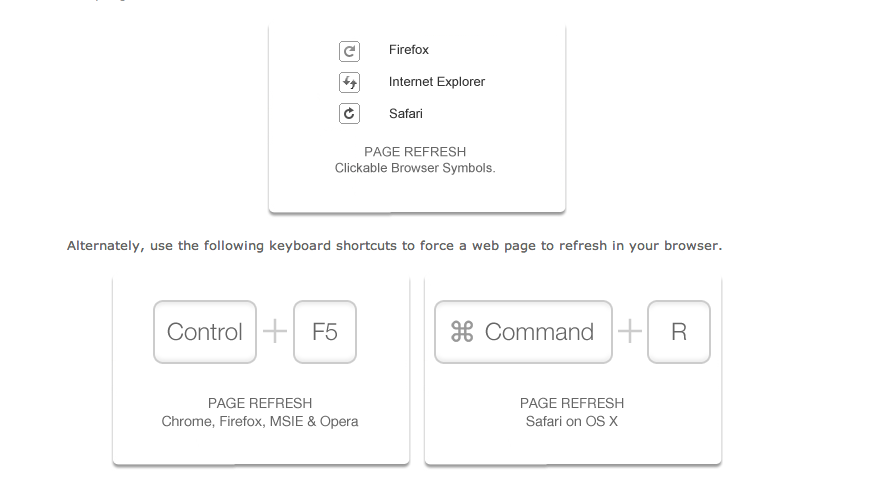
2. Clear your cache:
This is industry lingo for refreshing the files your computer has saved from the website to make it load faster the next time you visit the site.
If refreshing the page doesn’t work, clearing your cache is a great next step.
Here is an article on clearing your cache
3. Determine what browser you have.
A browser is the vehicle by which you access web pages. They are, from left to right- Safari, Firefox, Internet Explorer, Chrome and Opera.

4. Determine what version of the browser you have.
This step is different for every browser. Here are the steps for each.
Click to expand each article:
- How to determine what version of Safari you have
- How to determine what version of Firefox you have
- How to determine what version of Internet Explorer you have
- How to determine what version of Chrome you have
- How to determine what version of Opera you have
5. Update your browser:
Technology changes so fast, you may have an outdated browser version which is no longer supported by many websites.
A good website development firm will ensure the site they build is compatible with the majority of web users in your region, based on what browsers and versions are most commonly used
Updating your browser is easy and can usually be done in 3 minutes or less. Update your browser by clicking here.
It’s important for your security and an optimal web experience to ensure you’re installing updates on your computer for your operating system as well as browser updates.
Many browser updates will be issued to combat problems like identity theft, phishing sites, viruses, trojans, spyware, adware, and other sorts of malware. will be issued to combat just these problems.
If you have refreshed the website, cleared your cache and updated your browser and still you can’t see the website changes- send the browser and version to your website developer or designer so they can troubleshoot the issue on their end.