 Newsletters you signed up for might have disappeared, or maybe your online bill reminders don’t come anymore. Sound familiar?
If this is an issue for you, it’s probably because Gmail has divided your email into several tabs:
Priority – this is your main inbox
Social – this is anything it sees as related to social media
Promotions – anything related to discounts or special offers ends up here
Updates – anything related to bills, confirmations, receipts etc.
Forums – Mailing list emails and messages from online groups or discussion boards
It has been auto-sorting your emails into tabs for you now, thinking this is helpful. And sometimes it is!

But, if you aren’t in love with this new system, the good news is you don’t have to just ‘get used to it’ like so many other updates. This one, you can change.
If you would like to change your tabbed inbox, you have two choices – you can go back to exactly how things were before and get rid of Gmail tabs completely, or you can change it so emails to come into the tabs you think they ought to so it makes better sense to you.
Here’s how to do both.
TO GET RID OF GMAIL TABS
You can delete all tabs so that you only have one inbox again, or you can keep the ones you like.

In your Gmail account, click on the little ‘+’ button to the right of your Gmail tabs (shown in yellow above), and uncheck any tabs you don’t like having, then click ‘Save’. Voila! They’re gone forever.
From now on, everything that was sent to the banished tabs, will go to your main (priority) inbox, as will any emails that are in those tabs currently.
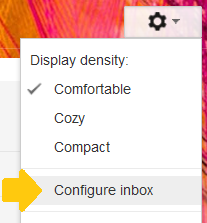
Note: If you get rid of Gmail tabs and later want to restore them, click on your settings cog inside Gmail and choose ‘Configure inbox’. A box will pop up asking which tabs you would like to enable. Select the ones you want, and then click ‘Save’.
TO CHANGE WHAT TAB AN EMAIL IS SORTED TO
If you want to get our emails in your main inbox, but Gmail is sending them to the ‘Forums’ tab, just left-click on the email you want to move and keep holding your mouse button down.
Now, while you are still holding the button, drag your mouse pointer over to the Priority tab.
Click ‘yes’ when a message appears asking you if you would like emails from this sender to go to this new tab from now on, and you’re done.
Happy Inboxing!
This post by Maria Schmidt